Rate Limiting
Real Incident: Twitter, 2022
Elon's first week: bots scraped Twitter at 10x normal rate. No effective rate limiting on the read path. Result: $100K+/day in excess infra costs, emergency "you are rate limited" pages for real users. Rate limiting isn't optional — it's survival.
The 30-Second Explanation
Rate limiting = controlling how many requests a user/service can make in a given time window.
Why Rate Limit?
Prevent abuse, protect downstream services, ensure fair usage, control costs
Without It?
One bad actor takes down your entire service. DDoS, scraping bots, buggy client retries.
The key insight: Rate limiting is NOT just about security. It's about service stability and fair resource allocation across tenants.
The Nightclub Analogy
You're a bouncer at a club with a 200-person capacity.
| Strategy | What the bouncer does | Real-world equivalent |
|---|---|---|
| Fixed Window | "200 people per hour. At :00, counter resets." | GitHub: 5000 req/hr |
| Sliding Window | "200 people in ANY rolling 60-min window." | Stripe API |
| Token Bucket | "Here's 200 tokens. You get 5 back per minute. Spend them however." | AWS API Gateway |
| Leaky Bucket | "Queue at the door. Let 3 in per minute, no matter what." | Network traffic shaping |
Algorithms at a Glance
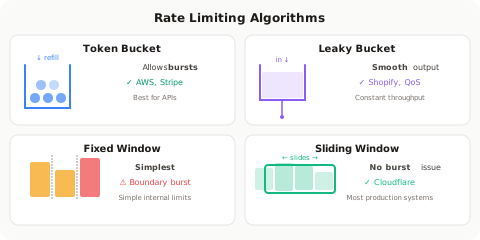
Algorithms — What FAANG Actually Asks
Fixed Window Counter
| Aspect | Detail |
|---|---|
| How | Count requests in fixed time windows (e.g., 12:00-12:01) |
| Pro | Dead simple. One counter per window. |
| Con | Burst at boundary — 100 reqs at 12:00:59 + 100 at 12:01:00 = 200 in 2 seconds |
| Used by | Basic API rate limiters, simple internal services |
Sliding Window Log
| Aspect | Detail |
|---|---|
| How | Store timestamp of every request. Count within window. |
| Pro | Perfectly accurate. No boundary burst. |
| Con | Memory-expensive. Storing every timestamp doesn't scale. |
| Used by | Low-volume, high-accuracy needs (fraud detection) |
Sliding Window Counter
| Aspect | Detail |
|---|---|
| How | Weighted average of current + previous window counts |
| Pro | Accurate enough, memory-efficient (just 2 counters) |
| Con | Approximation — not exact |
| Used by | Cloudflare, most production systems |
Token Bucket
| Aspect | Detail |
|---|---|
| How | Bucket holds tokens. Each request costs 1. Tokens refill at fixed rate. |
| Pro | Allows bursts (up to bucket size). Smooth average rate. |
| Con | Slightly more complex state (tokens + last_refill_time) |
| Used by | AWS, Stripe, most FAANG internal services |
Leaky Bucket
| Aspect | Detail |
|---|---|
| How | Requests enter a queue. Processed at fixed rate. Queue full = reject. |
| Pro | Perfectly smooth output rate. |
| Con | No bursts allowed. Queue adds latency. |
| Used by | Network traffic shaping, Shopify |
Where to Rate Limit
| Layer | What | Example |
|---|---|---|
| Client-side | Debounce, local throttle | Search autocomplete — wait 300ms before hitting API |
| Load Balancer / CDN | IP-based, geo-based | Cloudflare blocking IPs with 1000+ req/min |
| API Gateway | Per-user, per-API-key | Kong/Apigee enforcing 1000 req/min per key |
| Application | Business logic limits | Max 5 password attempts, max 3 OTP sends |
| Database | Connection pooling, query limits | Max 100 concurrent connections per service |
Distributed Rate Limiting — The Hard Part
Single server? Easy. In-memory counter.
100 servers behind a load balancer? Now you need shared state.
| Approach | Trade-off |
|---|---|
| Centralized (Redis) | Accurate but adds latency (1 network hop per request). Single point of failure. |
| Local + Sync | Each server counts locally, syncs periodically. Fast but can overshoot by N × local_limit. |
| Sticky Sessions | Route same user to same server. Simple but kills load balancing. |
| Cell-based | Partition users across cells. Each cell has its own limiter. Used at Uber scale. |
Interview Gold
"I'd use Redis with token bucket. Each request does an atomic EVAL script — check tokens, decrement, return allow/deny. Redis handles 100K+ ops/sec single-threaded, so it won't be the bottleneck. For fault tolerance, I'd fail-open briefly if Redis is down — better to let extra traffic through than reject everyone."
HTTP Response: What to Return
| Scenario | Response |
|---|---|
| Allowed | 200 OK with rate limit headers |
| Rate limited | 429 Too Many Requests |
| Headers to include | X-RateLimit-Limit, X-RateLimit-Remaining, X-RateLimit-Reset |
| Retry guidance | Retry-After: 30 (seconds until reset) |
Real Systems
| Company | Strategy | Details |
|---|---|---|
| GitHub | 5000 req/hr per token | Fixed window, returns headers |
| Stripe | Token bucket | 100 req/sec burst, 25/sec sustained |
| Twitter/X | Sliding window | 300 tweets/3hr, 900 reads/15min |
| Google Maps | Per-day + per-second | 28,500/day AND 50/sec |
| Cloudflare | Multi-layer | IP → ASN → Account → Rule-based |
The 3 Mistakes That Get You Rejected
Don't Say These
- "Just reject with 403" — Rate limiting returns
429, not403. You MUST includeRetry-Afterheader. Basic HTTP knowledge. - "Use a local counter on each server" — With 50 servers, that's 50x your intended limit. You need centralized or synchronized counting.
- "Rate limit everyone the same" — Differentiate between free/paid tiers, internal/external traffic, read/write operations.
Interview Answer Template
"For [system], I'd implement rate limiting at [layer] using [algorithm] because [reason]. For distributed enforcement, I'd use [Redis/local+sync] with [token bucket/sliding window]. Key decisions: fail-open vs fail-closed on limiter failure, per-user vs per-IP vs per-API-key granularity, and returning proper
429withRetry-Afterheaders for good client behavior."
Rate Limiting vs Throttling — The Difference That Trips Up Seniors
Why This Matters
In interviews at Stripe, Salesforce, and Amazon, interviewers specifically ask: "What's the difference between rate limiting and throttling?" Most candidates use them interchangeably — that's wrong, and it signals you haven't built these systems in production.
The Core Distinction
%%{init: {'theme': 'base', 'themeVariables': {'fontSize': '13px', 'fontFamily': 'Inter, -apple-system, sans-serif'}, 'flowchart': {'nodeSpacing': 30, 'rankSpacing': 50, 'padding': 12, 'curve': 'basis'}, 'sequence': {'actorMargin': 60, 'messageMargin': 40}, 'class': {'padding': 12}}}%%
flowchart TD
    REQ[Incoming Requests] --> RL{Rate Limiter}
    RL -->|Under limit| PASS[✓ Process normally]
    RL -->|Over limit| REJECT[✗ 429 Reject immediately]

    REQ2[Incoming Requests] --> TH{Throttler}
    TH -->|Under limit| PASS2[✓ Process normally]
    TH -->|Over limit| SLOW[⏳ Slow down / queue / degrade]

    style REJECT fill:#ef4444,color:#fff
    style SLOW fill:#f59e0b,color:#fff
    style PASS fill:#22c55e,color:#fff
style PASS2 fill:#22c55e,color:#fff| Aspect | Rate Limiting | Throttling |
|---|---|---|
| Action when exceeded | Hard reject (429 / drop) | Slow down (queue, delay, degrade) |
| Philosophy | "No. Come back later." | "OK but slower / less." |
| Who controls the pace | Server enforces on client | Can be client-side or server-side |
| User experience | Error message, must retry | Degraded but still working |
| Analogy | Bouncer: "Club's full, go away" | Speed bump: "Slow down but keep driving" |
| Response | Immediate rejection | Delayed processing or reduced quality |
| Data loss risk | Client must retry (may lose if no retry logic) | No loss — just slower |
Real-World Examples (All Levels)
For Junior Engineers: The Highway Analogy
Rate Limiting = Toll booth closes. Cars turned away. "Road full, take another route."
Throttling    = Speed limit drops from 100km/h to 60km/h. Everyone still moves, just slower.
For Senior Engineers: Production Patterns
| Scenario | Rate Limiting Approach | Throttling Approach |
|---|---|---|
| API overload | Return 429, client retries with backoff | Queue requests, process at sustainable rate |
| Database pressure | Reject new queries beyond connection pool | Reduce query concurrency, increase batch intervals |
| Microservice cascade | Circuit breaker opens → reject fast | Shed load gracefully: serve cached/stale data |
| User uploads | "Max 10 uploads/minute" → reject 11th | "Max 5MB/s upload speed" → slow transfer |
| Email sending | "Max 500 emails/day" → block email #501 | "Send at 10 emails/second" → queue the rest |
| Search API | "100 queries/minute per user" → reject | "Return top-5 results instead of top-50 when busy" |
For Architects: System-Level Patterns
Pattern 1: Adaptive Throttling (Netflix)
Normal load:     Full quality 4K stream (25 Mbps)
High load:       Downgrade to 1080p (5 Mbps)      ← Throttling (quality reduction)
Extreme load:    Downgrade to 720p (3 Mbps)       ← More throttling
Beyond capacity: "Service unavailable, try later"  ← Rate limiting kicks in
Pattern 2: Tiered Throttling (AWS)
Free tier:       Throttled to 1 req/sec sustained (burst to 5)
Standard tier:   Throttled to 10 req/sec sustained (burst to 100)
Enterprise tier: Throttled to 1000 req/sec sustained (burst to 5000)
Exceeded tier:   429 Too Many Requests             ← Rate limited
Pattern 3: Backpressure Throttling (Kafka Consumers)
Consumer lag < 1000:   Process at full speed
Consumer lag > 10000:  Throttle producer (slow accepts)
Consumer lag > 100000: Rate limit producer (reject new messages)
Where Each Applies in a Typical Architecture
%%{init: {'theme': 'base', 'themeVariables': {'fontSize': '13px', 'fontFamily': 'Inter, -apple-system, sans-serif'}, 'flowchart': {'nodeSpacing': 30, 'rankSpacing': 50, 'padding': 12, 'curve': 'basis'}, 'sequence': {'actorMargin': 60, 'messageMargin': 40}, 'class': {'padding': 12}}}%%
flowchart LR
    subgraph "Client Side"
        DEB[Debounce/Throttle<br/>UI events]
    end

    subgraph "Edge / CDN"
        RL1[Rate Limit<br/>by IP · DDoS protection]
    end

    subgraph "API Gateway"
        RL2[Rate Limit<br/>by API key · per-plan]
        TH1[Throttle<br/>queue overflow requests]
    end

    subgraph "Application"
        TH2[Throttle<br/>degrade gracefully under load]
    end

    subgraph "Database"
        TH3[Throttle<br/>connection pool · query queue]
        RL3[Rate Limit<br/>max connections hard cap]
    end

    DEB --> RL1 --> RL2 --> TH1 --> TH2 --> TH3

    style RL1 fill:#ef4444,color:#fff
    style RL2 fill:#ef4444,color:#fff
    style RL3 fill:#ef4444,color:#fff
    style TH1 fill:#f59e0b,color:#fff
    style TH2 fill:#f59e0b,color:#fff
    style TH3 fill:#f59e0b,color:#fff
    style DEB fill:#3b82f6,color:#fff
Client-Side Throttling Patterns (JavaScript/Java)
// THROTTLE: Execute at most once per interval (steady rate)
// Use for: scroll events, resize, real-time search-as-you-type
function throttle(fn, limit) {
  let lastCall = 0;
  return (...args) => {
    const now = Date.now();
    if (now - lastCall >= limit) {
      lastCall = now;
      fn(...args);
    }
  };
}

// DEBOUNCE: Execute only after user STOPS for N ms
// Use for: search input (wait until user finishes typing)
function debounce(fn, delay) {
  let timer;
  return (...args) => {
    clearTimeout(timer);
    timer = setTimeout(() => fn(...args), delay);
  };
}

// Usage
searchInput.addEventListener('input', throttle(callAPI, 300));  // Max 1 call per 300ms
searchInput.addEventListener('input', debounce(callAPI, 500));  // Wait 500ms of silence
// RATE LIMITER: Hard reject after limit
RateLimiter rateLimiter = RateLimiter.of("api",
    RateLimiterConfig.custom()
        .limitForPeriod(100)           // 100 requests
        .limitRefreshPeriod(Duration.ofSeconds(1))  // per second
        .timeoutDuration(Duration.ZERO) // reject immediately (no waiting)
        .build());

// BULKHEAD (Throttle): Queue overflow, process at capacity
Bulkhead bulkhead = Bulkhead.of("db",
    BulkheadConfig.custom()
        .maxConcurrentCalls(25)         // only 25 concurrent DB calls
        .maxWaitDuration(Duration.ofMillis(500)) // queue for up to 500ms
        .build());

// RATE LIMITER: returns 429 immediately when exceeded
// BULKHEAD: queues up to 500ms, then rejects — this IS throttling
// Guava RateLimiter is actually a THROTTLER, not a rate limiter
// It blocks (slows down) callers instead of rejecting them
RateLimiter limiter = RateLimiter.create(10.0); // 10 permits per second

// This BLOCKS until a permit is available — throttling behavior
limiter.acquire(); // Waits if necessary (does not reject)
processRequest();

// vs. tryAcquire — this is rate limiting (reject if unavailable)
if (!limiter.tryAcquire()) {
    return ResponseEntity.status(429).body("Too many requests");
}
processRequest();
@Component
public class AdaptiveThrottleFilter extends OncePerRequestFilter {

    private final AtomicInteger activeRequests = new AtomicInteger(0);
    private static final int THROTTLE_THRESHOLD = 500;
    private static final int REJECT_THRESHOLD = 1000;

    @Override
    protected void doFilterInternal(HttpServletRequest request,
            HttpServletResponse response, FilterChain chain)
            throws ServletException, IOException {

        int current = activeRequests.incrementAndGet();
        try {
            if (current > REJECT_THRESHOLD) {
                // RATE LIMIT: hard reject
                response.setStatus(429);
                response.setHeader("Retry-After", "5");
                response.getWriter().write("Service overloaded");
                return;
            }
            if (current > THROTTLE_THRESHOLD) {
                // THROTTLE: degrade response
                request.setAttribute("degraded", true); // signal to return less data
            }
            chain.doFilter(request, response);
        } finally {
            activeRequests.decrementAndGet();
        }
    }
}
Throttling Strategies for Architects
| Strategy | How It Works | When to Use | Example |
|---|---|---|---|
| Request queuing | Excess requests wait in a queue | Acceptable latency increase | SQS between services |
| Adaptive concurrency | Dynamically reduce parallelism as latency rises | Protect downstream dependencies | Netflix concurrency limiter |
| Quality degradation | Serve cheaper/smaller responses under load | User-facing services | Return 10 results instead of 50 |
| Priority-based | Throttle low-priority traffic first | Multi-tenant platforms | Free-tier throttled before paid |
| Backpressure | Signal upstream to slow down | Stream processing | Kafka consumer lag → producer slowdown |
| Circuit breaker | Stop calling failed dependency entirely | Cascading failure prevention | Hystrix/Resilience4j |
The Combined Pattern: Rate Limit + Throttle Together
Most production systems use both — throttling first, rate limiting as the hard backstop:
%%{init: {'theme': 'base', 'themeVariables': {'fontSize': '13px', 'fontFamily': 'Inter, -apple-system, sans-serif'}, 'flowchart': {'nodeSpacing': 30, 'rankSpacing': 50, 'padding': 12, 'curve': 'basis'}, 'sequence': {'actorMargin': 60, 'messageMargin': 40}, 'class': {'padding': 12}}}%%
flowchart LR
    R[Request] --> T{Current load?}
    T -->|"< 70% capacity"| FULL[Full Response<br/>200 OK]
    T -->|"70-90% capacity"| DEGRADE[Degraded Response<br/>200 OK · less data]
    T -->|"90-100% capacity"| QUEUE[Queue & Wait<br/>200 OK · delayed]
    T -->|"> 100% capacity"| REJECT[429 Rejected<br/>Retry-After: 5s]

    style FULL fill:#22c55e,color:#fff
    style DEGRADE fill:#84cc16,color:#fff
    style QUEUE fill:#f59e0b,color:#fff
    style REJECT fill:#ef4444,color:#fff
Real example — Salesforce API Governor Limits:
| Load Level | Response | What Happens |
|---|---|---|
| Normal | Full query results, all fields | Standard processing |
| Approaching limit | Warn via Sforce-Limit-Info header | Throttle signal to client |
| At daily limit | REQUEST_LIMIT_EXCEEDED | Rate limited for 24 hours |
| Concurrent limit | Queue for up to 5 minutes | Throttled (queued) |
| Beyond concurrent + patience | UNABLE_TO_LOCK_ROW / timeout | Hard rejection |
Real example — Stripe API:
| Behavior | Type | Detail |
|---|---|---|
| 25 req/sec sustained rate | Throttling | Requests above this are queued briefly |
| 100 req/sec burst | Rate Limit trigger | Beyond burst → immediate 429 |
Retry-After header | Recovery signal | "Try again in N seconds" |
| Exponential backoff expected | Client-side throttle | Good clients slow themselves down |
Interview Answer: Rate Limiting vs Throttling
The Answer That Impresses
"Rate limiting and throttling are complementary but different. Rate limiting is a hard boundary — exceed it and you get rejected with
429. Throttling is graceful degradation — the system slows down, queues, or reduces quality instead of rejecting outright.In practice, I use both in layers:
- Client-side throttle (debounce/throttle) reduces unnecessary requests
- API Gateway rate limit (token bucket in Redis) enforces per-customer plans
- Application-level throttle (adaptive concurrency) degrades gracefully under load
- Database rate limit (connection pool hard cap) prevents resource exhaustion
The key insight: throttling is about service quality trade-offs (serve slower/less), while rate limiting is about hard protection (stop serving entirely). Netflix throttles video quality from 4K to 720p before ever showing an error page."
Common Mistakes in Interviews
| Mistake | Why It's Wrong | Correct Answer |
|---|---|---|
| "Rate limiting and throttling are the same" | They have different behaviors (reject vs slow) | "Rate limiting rejects; throttling degrades gracefully" |
| "Always rate limit at the gateway" | Ignores client-side and application-level strategies | "Defense in depth — throttle at client, rate limit at gateway, throttle at app" |
| "Use fixed window everywhere" | Burst at boundaries allows 2x limit | "Token bucket for APIs (allows controlled bursts)" |
| "Fail-closed when limiter is down" | Self-inflicted outage — all traffic rejected | "Fail-open with local fallback counter" |
| "Same limits for all users" | Punishes paying customers equally | "Tiered limits: free < standard < enterprise" |
| "Throttle by IP address" | Corporate NATs share one IP → blocks entire companies | "Prefer API key or user_id for authenticated traffic" |
Debounce vs Throttle vs Rate Limit — Final Comparison
| Technique | Where | Action | Behavior |
|---|---|---|---|
| Debounce | Client-side | Wait until activity stops | Execute once after N ms of silence |
| Throttle | Client or Server | Limit execution frequency | Execute at most once per N ms (steady drip) |
| Rate Limit | Server-side | Hard cap on requests | Reject with 429 when count exceeds limit |
Timeline (X = event, O = execution):

Events:    X X X X X - - - X X X X X - - - - -

Debounce:  - - - - - - - O - - - - - - - - O  (fires AFTER silence)
Throttle:  O - - - O - - - O - - - O - - - -  (fires every N ms)
Rate Limit: O O O O O ✗ ✗ ✗ O O O O O ✗ ✗ ✗  (allows N, rejects rest)
Quick Recall Card
| Question | Answer |
|---|---|
| Best algorithm for bursts? | Token Bucket (allows burst up to bucket size) |
| Best for smooth rate? | Leaky Bucket (fixed output rate) |
| Best accuracy/memory trade-off? | Sliding Window Counter |
| Where to store state (distributed)? | Redis (atomic operations, fast, shared) |
| What HTTP code? | 429 Too Many Requests |
| Fail-open or fail-closed? | Usually fail-open (let traffic through if limiter is down) |
| Per what? | Depends: per-user, per-IP, per-API-key, per-endpoint |