Data Partitioning
Real Incident: Uber's Schemaless, 2014
Uber's trip data grew to billions of rows on PostgreSQL. Queries that took 5ms at 1M rows took 500ms at 1B rows. Backups took 18 hours. They built Schemaless — partitioned by city + time. Trip query in São Paulo only scans São Paulo's partition. Query time back to 5ms regardless of global data size. Partitioning makes the impossible query fast by narrowing the search space.
Why This Comes Up in Interviews
Partitioning is more fundamental than sharding — it's the STRATEGY, while sharding is one implementation. It appears when:
- "How do you handle 1B+ rows efficiently?" → Partition
- "How do you design DynamoDB's key schema?" → Partition key + sort key
- "How do you avoid hot partitions in Kafka?" → Partition key design
- "How do you optimize time-series queries?" → Time-based partitioning
Key distinction: Partitioning = dividing data by some criteria. Sharding = partitioning across MACHINES. You can partition within one database.
Partitioning vs Sharding vs Table Partitioning
| Concept | Where Data Lives | Who Manages | Example |
|---|---|---|---|
| Table Partitioning | Same machine, managed by DB | Database engine | PostgreSQL PARTITION BY RANGE (created_at) |
| Partitioning (general) | Any arrangement | Application or middleware | Kafka partitions, DynamoDB partitions |
| Sharding | Different machines | Application or proxy | Instagram's user_id-based PostgreSQL shards |
Why it matters: Table partitioning is free optimization (DB handles it). Sharding is an architectural decision with major trade-offs.
Three Dimensions of Partitioning
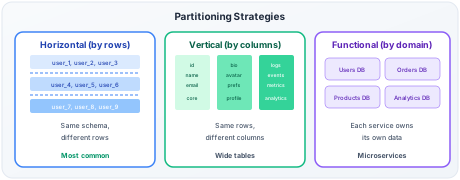
Horizontal Partitioning (Most Common)
Split by rows: Different rows in different partitions. Same schema everywhere.
| Method | How | Best For | Worst For |
|---|---|---|---|
| Hash | partition = hash(key) % N | Even distribution, point lookups | Range queries (must scan all) |
| Range | Partition by value ranges | Time-series, range scans | Hot partition on active range |
| List | Partition by explicit values | Geographic, categorical data | Uneven category sizes |
| Composite | Partition key (hash) + sort key (range) | Flexible (DynamoDB model) | Complex key design |
Vertical Partitioning
Split by columns: Frequently-accessed columns separated from rarely-accessed ones.
| Example | Partition A (hot) | Partition B (cold) |
|---|---|---|
| User table | id, name, email, status | bio, avatar_url, preferences, settings |
| Product table | id, name, price, stock | description, reviews, specifications |
Why: If 95% of queries only need 4 columns, why load 40 columns from disk?
Functional Partitioning
Split by feature/domain: Each bounded context gets its own database.
| Service | Database | Data |
|---|---|---|
| User service | users_db | Profiles, auth, preferences |
| Order service | orders_db | Orders, line items, payments |
| Inventory service | inventory_db | Stock levels, warehouses |
| Analytics service | analytics_db | Events, metrics, logs |
This is essentially the microservices "database per service" pattern.
Partition Key Design — The DynamoDB Mental Model
DynamoDB's key model is the best framework for thinking about partition design in interviews:
Partition Key (PK): Determines WHICH partition. Must be high-cardinality, evenly distributed. Sort Key (SK): Determines ORDER within a partition. Enables range queries.
Design Patterns
| Access Pattern | Partition Key | Sort Key | Query |
|---|---|---|---|
| User's recent orders | user_id | order_timestamp | "Last 10 orders for user X" → single partition |
| Chat messages | conversation_id | message_timestamp | "Messages in convo Y since Z" → single partition |
| IoT sensor readings | device_id | reading_timestamp | "Device Z readings for today" → single partition |
| Product reviews | product_id | review_timestamp | "Latest reviews for product P" → single partition |
The golden rule: Design so that 95%+ of queries hit a SINGLE partition.
Anti-Patterns (What NOT to Do)
| Bad Key | Why It Fails | Fix |
|---|---|---|
date as PK | Today's partition gets ALL writes (hot) | Use entity_id as PK, date as SK |
status as PK ("active"/"inactive") | Two partitions, 90% data in "active" | Use user_id as PK, query with filter |
country as PK | US/India partition 100x larger than Iceland | Hash-based PK, country as attribute |
Sequential order_id as PK | Recent orders all go to latest partition | Hash of order_id, or user_id as PK |
The Hot Partition Problem — Deep Dive
What makes a partition hot: - Celebrity account: one partition key gets 1000x traffic (Justin Bieber's timeline) - Temporal hotspot: "today" partition gets all writes in time-series data - Category skew: "electronics" category has 10x items vs "garden supplies"
Back-of-envelope: - DynamoDB partition limit: ~3000 RCU / 1000 WCU per partition (baseline planning numbers — since 2018-2019, adaptive capacity and burst capacity allow individual partitions to temporarily exceed these limits, so they are no longer hard ceilings) - Celebrity with 100M followers: follower fanout = 1M writes/sec during a post - Single partition handles 1000 WCU → needs 1000 partitions for that ONE user
Solutions by Pattern
| Pattern | Strategy | How | Trade-off |
|---|---|---|---|
| Write sharding | Add random suffix to PK | celebrity_123#0 through celebrity_123#9 | Reads scatter across 10 partitions → parallel read + merge |
| GSI overloading | Use multiple access patterns in one table | Different SK patterns for different queries | Complex schema |
| Time bucketing | Split hot time partition | 2024-01-15#0, 2024-01-15#1 | Reads need multiple queries |
| Separate table | Hot data in dedicated table with higher capacity | VIP users → separate table | Operational overhead |
| Caching | Cache hot partition reads | Redis in front of hot partition | Cache invalidation |
Instagram's approach: For celebrity accounts, partition key = user_id + random(0-9). Writes spread across 10 partitions. Reads: 10 parallel queries → merge → return. Works because read fanout (10 queries) is cheap, write hotspot (10,000 WCU on one partition) is impossible.
Read Fan-Out Tradeoff
Spreading writes across 10 partitions means reads now require scatter-gather across all 10, adding tail latency variance (p99 is bounded by the slowest partition). This is acceptable for write-heavy workloads (celebrity posts) but problematic for read-heavy patterns — if a key is read 1000x per second, you're paying 10,000 partition reads instead of 1,000. Only apply write sharding to genuinely write-hot keys.
Secondary Indexes with Partitioned Data
The core problem: Primary data is partitioned by entity_id. But you also need to query by email, timestamp, or category.
| Index Type | Where It Lives | Read | Write | Consistency |
|---|---|---|---|---|
| Local secondary index | Same partition as data | Fast (same partition) | Fast (same partition) | Strong |
| Global secondary index | Separate partitions (by indexed attribute) | Fast (goes to right index partition) | Slow (async replication) | Eventually consistent |
DynamoDB Example
- Table: PK =
user_id, SK =order_timestamp - LSI: Sort by
order_total(same partition, different sort order) - GSI: PK =
product_id, SK =order_timestamp(query: "all orders for product X")
GSI write amplification: Every write to main table → also writes to GSI partitions. 3 GSIs = 4x write cost.
Partitioning Strategies in Real Systems
| System | Partitioning | Key Design | Rebalancing |
|---|---|---|---|
| DynamoDB | Hash(PK) → partition | Composite key (PK + SK) | Automatic split on hot partition |
| Cassandra | Consistent hash ring | Partition key → token | Vnodes for even distribution |
| Kafka | Hash(message key) % partitions | Message key decides partition | Manual partition reassignment |
| PostgreSQL | Declarative (RANGE, LIST, HASH) | Any column(s) | Manual (attach/detach partitions) |
| Elasticsearch | Hash(doc_id) % shards | Document _id or custom routing | Shard allocation API |
| BigQuery | Time-based + clustering | Ingestion time or column | Automatic |
| MongoDB | Range or hash | Shard key field | Automatic chunk splitting + migration |
PostgreSQL Table Partitioning (Free Performance)
When: Single table > 10M rows with identifiable access patterns (usually time-based).
| Benefit | How |
|---|---|
| Query speed | Partition pruning — DB skips irrelevant partitions entirely |
| Vacuum speed | Vacuum each partition independently (smaller tables) |
| Bulk delete | Drop old partition instead of DELETE (instant vs hours) |
| Index size | Smaller indexes per partition (fit in memory) |
Common patterns:
| Data Type | Partition By | Retention |
|---|---|---|
| Logs/events | Monthly or weekly | Drop partitions > 90 days |
| Orders | Monthly | Keep forever, archive old to cold storage |
| Time-series metrics | Daily | Drop partitions > 30 days |
| Audit trail | Yearly | Compress old partitions |
Back-of-envelope benefit: - 1B row table, query needs last 7 days - Without partitioning: index scan on 1B rows → seconds - With daily partitions: only 7 partitions scanned, each ~3M rows → milliseconds - Speedup: ~50x for time-bounded queries
Partition Rebalancing
When needed: Partition grows too large, or load becomes uneven.
| Strategy | How | Downtime | Used By |
|---|---|---|---|
| Fixed partitions | Create many upfront, never change | None | Kafka (can't change partition count easily) |
| Dynamic splitting | Hot/large partition automatically splits | None | DynamoDB, HBase |
| Consistent hashing | Add node → steal ~1/N from all others | Minimal | Cassandra |
| Manual rebalance | Operator triggers migration | Depends | Elasticsearch (shard allocation) |
DynamoDB auto-split: - Partition gets > 10GB or > 3000 RCU → automatically splits into two - No downtime, no application awareness needed - But: too many splits = too many partitions = metadata overhead
Interview Framework
When designing a data model:
Step 1 — Identify access patterns: "The primary queries are [per-user lookups / time-range scans / category filtering]. This tells me the partition key should be [entity that 95%+ queries filter by]."
Step 2 — Choose partition key: "I'd partition by [user_id/device_id/conversation_id] because it's [high cardinality, immutable, matches access pattern]. Sort key would be [timestamp] for range queries within partition."
Step 3 — Hot partition mitigation: "If any entity becomes disproportionately hot, I'd use write sharding — append random suffix to PK, reads do parallel scatter-gather across suffixes."
Step 4 — Secondary access: "For queries not aligned with PK (e.g., 'all orders for product X'), I'd add a [GSI / Elasticsearch index / denormalized table]."
Step 5 — Rebalancing: "I'd use [DynamoDB auto-split / logical partition indirection / over-provisioned partition count] so growth doesn't require manual intervention."
Quick Recall
| Question | Answer |
|---|---|
| Partitioning vs sharding? | Partitioning = logical division. Sharding = across machines. |
| Hash vs range partition? | Hash = even distribution, no range queries. Range = range queries, hotspot risk. |
| Composite key model? | Partition key (hash → which partition) + Sort key (range within partition) |
| Hot partition fix? | Write sharding (random suffix), caching, separate table |
| DynamoDB auto-split? | Partition > 10GB or > 3000 RCU → splits automatically |
| Table partitioning benefit? | Partition pruning, faster vacuum, instant bulk delete |
| Secondary index trade-off? | Local = strong consistency. Global = eventual, async replication. |
| Golden rule? | 95%+ queries should hit single partition |